Give every image, artwork, or product a permanent public URL — independent of where the file actually lives on your server.

Why a permanent identifier matters
Files move. Themes change. Galleries get reorganized, uploads get migrated to a new folder, a CDN gets swapped, an image gets replaced with a higher-resolution scan. Every time that happens, any link pointing at the old file — a backlink, a Pinterest pin, a blog embed, a shared image URL — breaks.
Re{code} Object Identifier fixes this by attaching a permanent, human-readable identifier to any object in your WordPress database (an attachment, a post, a WooCommerce product) and exposing it through a handful of clean, stable public routes. The identifier never changes, even if everything behind it does — much like a DOI for a research paper, or an accession number in a museum collection.
One field. Four public routes. Zero symlinks.
Key Features
Built for anyone who needs a stable, public identity for their media — art dealers, galleries, funds, collectors, and any catalogue-style WooCommerce store.Permanent Object URLs
/id/{identifier} resolves to the object's canonical page — the URL never changes even if the post, file, or theme does
Direct Media Delivery
/media/{identifier} and /media/{identifier}/full|large|medium|thumbnail serve the image itself, with ETag / Last-Modified / Cache-Control — no upload path exposed
Ready-Made Embeds
/embed/{identifier} outputs a clean, shareable page with Open Graph and Twitter Card tags — image previews look right wherever they're pasted
JSON API
/api/{identifier} returns title, description, caption, alt text, canonical URL, and every image size — ready for integrations or structured data
Smart Canonical Resolution
Attachments automatically resolve to their parent archive page with a deep-link anchor when your theme supports it — falls back safely everywhere else
WooCommerce SKU Matching
Optional "Also match products by their WooCommerce SKU (_sku)" toggle — alongside your own custom field, no need to duplicate the identifier
Legacy Field Fallback
Point to your existing meta key (e.g. an ACF field you already use) with comma-separated fallbacks — migrate without losing a single record
Configurable Object Sources
Choose exactly which post types the plugin scans when resolving an identifier — Posts, Pages, Media, Products, and any other public or custom post type on your site
Fully Configurable Routes
Rename any route's slug — /id/, /art/, /object/, whatever fits your brand — matching is case-insensitive by default
Hotlink Statistics
See which external sites are embedding your images, aggregated by referring domain — bots and self-referrals are filtered out automatically
Clean Text Output
Titles and descriptions are normalized before they reach JSON or embeds — no stray “ entities or leftover line breaks
Secure by Design
Settings API with nonces, strict sanitization on every field, and route matching validated against real registered post types
Screenshots
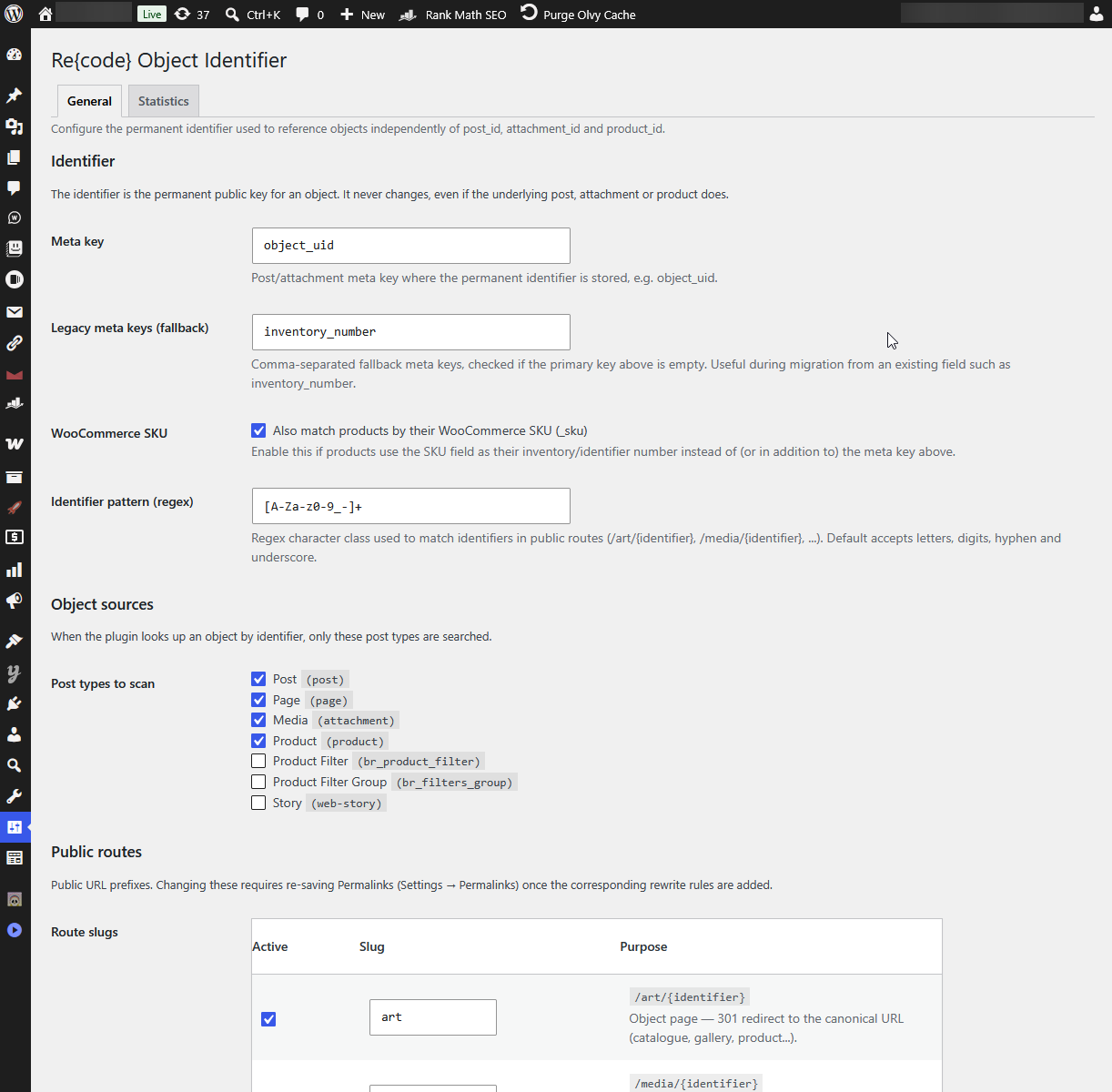
Settings → General — identifier meta key, legacy fallback, WooCommerce SKU matching, and object sources
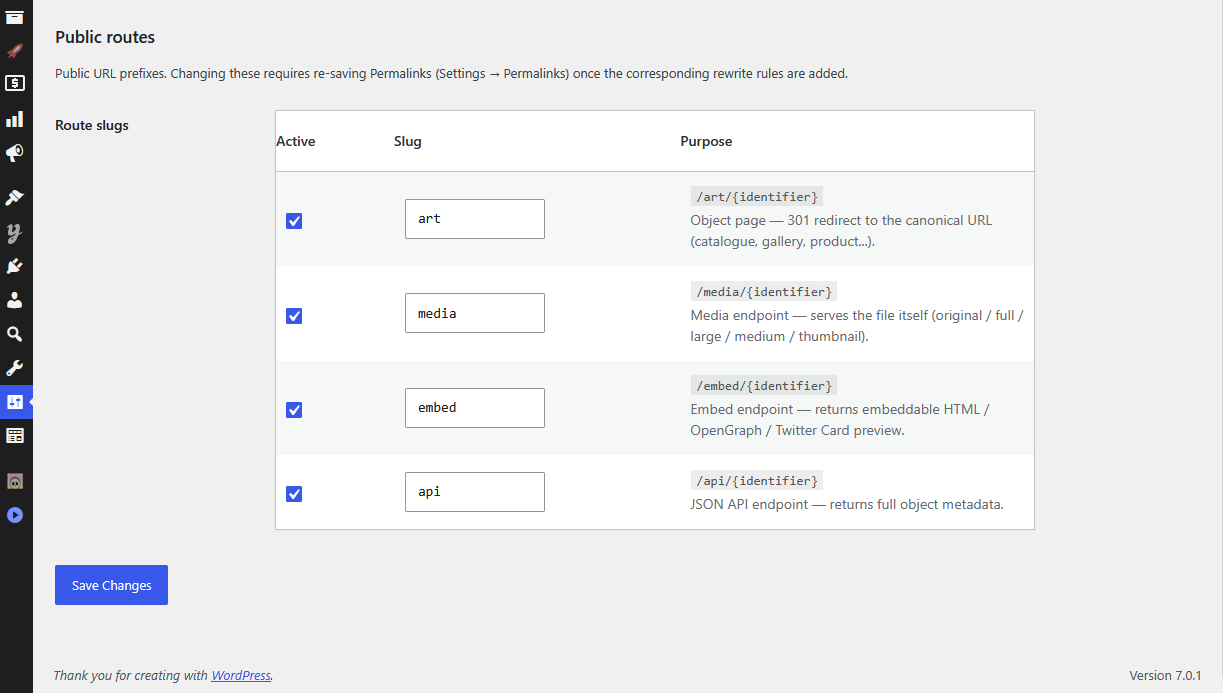
Public routes — active toggle, editable slug, and purpose for each of the four endpoints
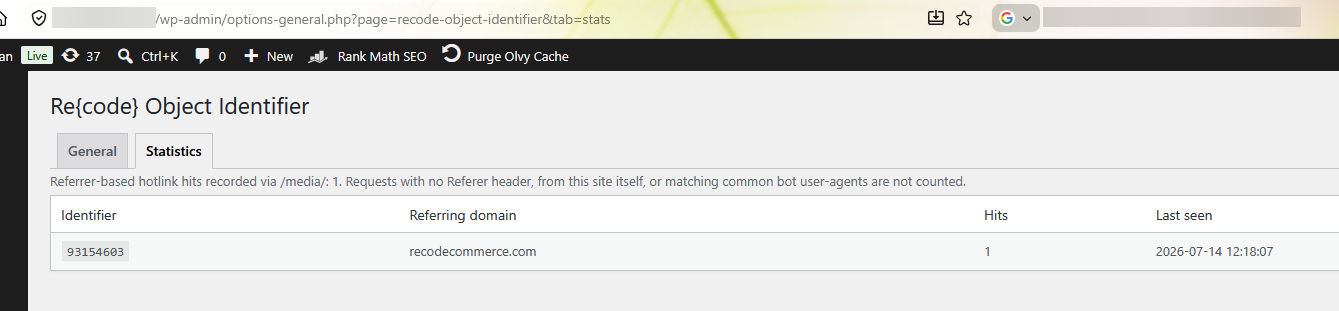
Statistics at a glance — identifier, referring domain, hit count, and last seen
A Real Example
On shulmanart.com, every painting carries its own inventory number. Once that number is registered as the object's identifier, it becomes a permanent public handle for the piece — for example, identifier 93154603 resolves at:
https://shulmanart.com/art/93154603That single URL stays valid however the painting is filed, moved between galleries, or re-exported at a new resolution — while /media/93154603, /embed/93154603, and /api/93154603 give you the raw image, a share-ready preview, and structured data for the same painting, respectively.
Who This Is For
- Galleries & artist archives — give every work a permanent link that survives re-catalogueing and site redesigns
- Collectors & private funds — a lightweight, self-hosted cataloguing layer on top of a collection you already manage in WordPress
- Museums & institutions — accession-number-style identifiers exposed as clean, linkable, embeddable URLs
- WooCommerce catalogue stores — stable product links and embeds that work independent of SKU changes or catalogue restructuring
Installation
Manual Upload
- Download the plugin ZIP file
- Upload via Plugins → Add New → Upload Plugin
- Activate — then configure identifier and routes under Settings → Object Identifier
Requirements
- WordPress 5.9 or higher (tested up to 6.9)
- PHP 7.4 or higher
- WooCommerce (optional, required only for SKU matching)
- An existing meta field or ACF field already holding your identifier (or start fresh with the plugin's default)
Frequently Asked Questions
Do I need to change my existing custom field?
No. Point the plugin's Meta key setting at your existing field (e.g. an ACF text field like inventory_number) and it works immediately — no data migration required.
Does this only work for art galleries?
No — that's simply the first use case. Any post type or WooCommerce product with a unique identifying value can be exposed this way: real estate listings, product catalogues, document archives, or media libraries.
Will this slow down my site?
No. Object lookups are cached for 5 minutes, and routes only add a single lightweight rewrite check — there's no overhead on pages that don't use the identifier routes.
What happens if an identifier isn't found?
The plugin returns a standard 404 — it never guesses or falls back to unrelated content.
Can I rename the routes later?
Yes, at any time from Settings → Object Identifier → Public routes. Rewrite rules are refreshed automatically on save.
Changelog
- Initial public release
- Added: Configurable public routes — object page, media, embed, and JSON API
- Added: Identifier resolution via primary meta key, legacy fallback keys, and optional WooCommerce SKU matching
- Added: Smart canonical URL resolution — attachments resolve to their parent archive page with a deep-link anchor where supported
- Added: Media resolver with automatic fallback (attachment → featured image → WooCommerce product image → first attached image)
- Added: Case-insensitive route and identifier matching
- Added: Hotlink statistics — hits aggregated by referring domain, with bot and self-referral filtering
- Added: Text normalization for titles, descriptions, captions, and alt text in API and embed output
- Fixed: Rewrite rules now refresh reliably on settings save, regardless of hook order
Need something this plugin doesn't cover?
We build custom plugins, integrations and features for WordPress and WooCommerce — from cataloguing systems to complex business logic.
Discuss Your Project →