Building a speech-to-text tool looks deceptively simple.
Upload an audio file, send it to a transcription API, display the text. Add a translation button and an export option, and you have a product.
That approach works for a short voice memo.
It becomes much more interesting when the requirements are different:
- audio files can be large;
- transcription should work with more than one AI provider;
- long recordings should not fail because of a server timeout;
- transcripts should be readable rather than a single wall of text;
- formatting should not require another AI request;
- translation should preserve the structure of the original transcript;
- and uploaded audio, logs, authentication, and API errors need to be handled safely.
That is the engineering problem behind the Re{code} Commerce Speech to Text tool.
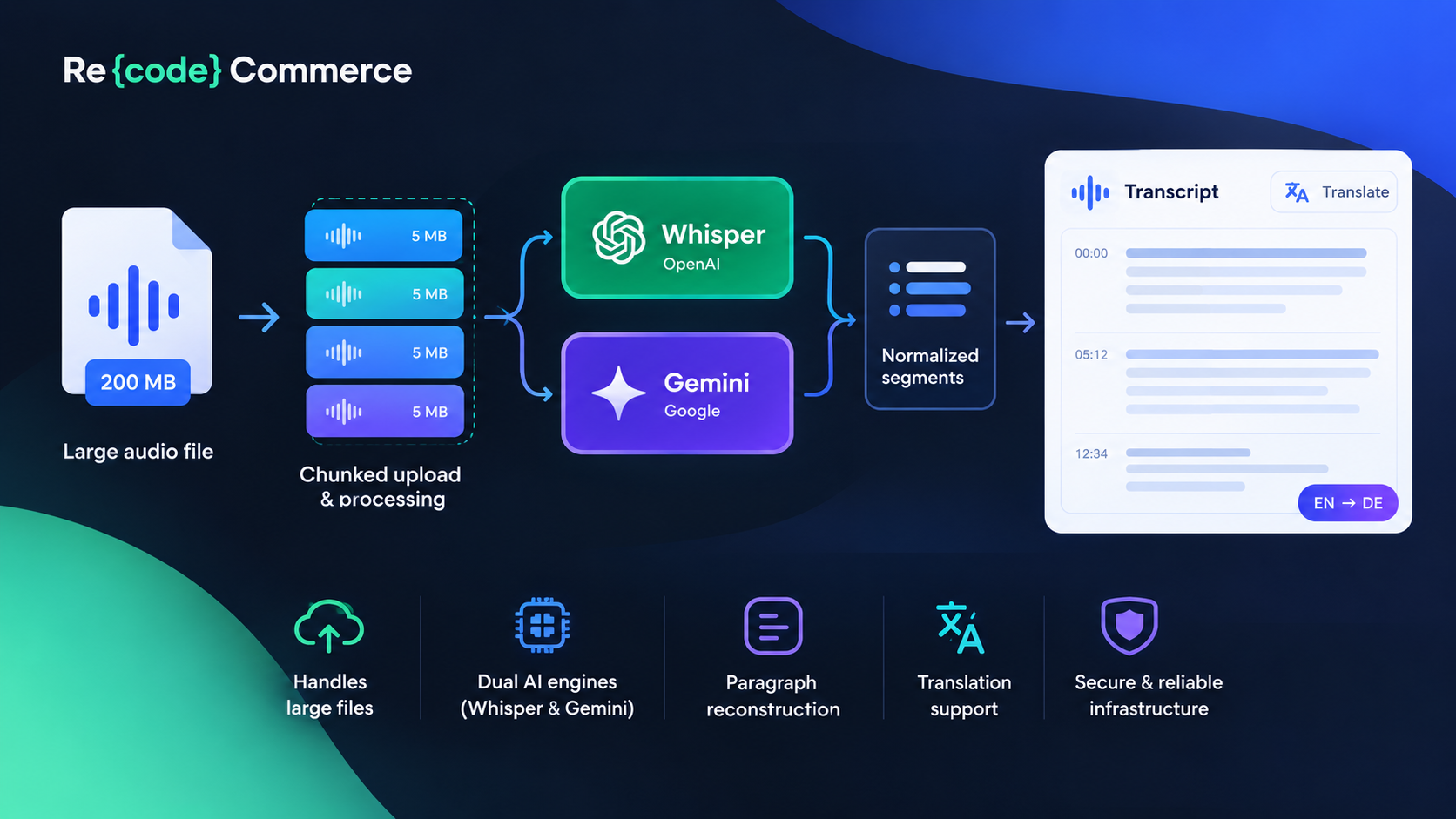
The final system is a self-hosted PHP application that can transcribe audio using either OpenAI Whisper or Google's Gemini transcription model, reconstruct paragraphs from natural pauses, optionally translate the transcript into another language, and export the result.
The interesting part is not the transcription API itself.
It is everything around it.
The architecture: one pipeline, two transcription engines
The basic flow looks like this:
Audio file
    │
    ▼
Browser chunked upload
    │
    ▼
Server-side reassembly
    │
    ▼
Audio segmentation
    │
    ├───────────────┐
    ▼               ▼
 Whisper          Gemini
    │               │
    └───────┬───────┘
            ▼
     Normalized segments
            │
            ▼
    Paragraph reconstruction
            │
            ├───────────────┐
            ▼               ▼
        Original         Translation
                            │
                            ▼
                          Export
The key architectural decision was to treat the transcription provider as an engine, rather than building the rest of the application around a particular API.
A request chooses an engine, and everything downstream expects the same internal representation.
That sounds like a small abstraction.
In practice, it prevents a lot of provider-specific logic from leaking into the rest of the application.
Why support two engines?
The default engine is OpenAI Whisper, using the whisper-1 model and the transcription endpoint with verbose_json.
Gemini provides a different set of capabilities. In particular, its transcription API can provide word-level timestamps and can handle dynamic language switching within a recording.
The important part is that the application does not need two separate pipelines.
Whisper and Gemini produce very different response structures, so the backend normalizes them first. After that point, paragraph formatting, translation, and export operate on the same internal data regardless of which provider generated the transcript.
This is a useful pattern for AI integrations in general:
Normalize the provider response at the boundary, not throughout the application.
That keeps the rest of the codebase independent from the quirks of individual AI APIs.
Large audio files are an infrastructure problem, not just an API problem
One of the first requirements was supporting large recordings without asking the user to manually cut them into smaller files.
A traditional HTML upload creates a simple problem:
Large audio file
       │
       ▼
One huge HTTP POST
       │
       ├── PHP upload_max_filesize
       ├── PHP post_max_size
       ├── proxy timeout
       ├── PHP-FPM timeout
       └── transcription timeout
There are several independent limits involved.
So the browser does not send the entire recording in one request.
Instead, the file is split into 5 MB chunks in the browser. Each chunk is uploaded independently using fetch(), and the server reassembles the original file after all pieces arrive.
This solves two problems simultaneously.
First, a large recording no longer has to fit inside a single PHP POST request.
Second, the UI can display actual upload progress because the application knows how many chunks have already been transferred.
That is much more useful than displaying a spinner while a large request is running.
Uploading in chunks was only half the solution
Initially, the architecture split large files for upload but still attempted to transcribe all resulting audio chunks inside one long-running PHP request.
That turned out to be the wrong boundary.
A 200 MB recording could be uploaded successfully and then fail during transcription because the server had to keep one HTTP request alive while sequentially calling the transcription API.
The solution was to move the chunk boundary one level deeper:
Upload chunk 1 ──► Transcribe chunk 1
Upload chunk 2 ──► Transcribe chunk 2
Upload chunk 3 ──► Transcribe chunk 3
...
Each transcription chunk gets its own HTTP request.
This is an important distinction.
Chunked upload protects the upload operation.
Chunked transcription protects the processing operation.
They solve different failure modes.
Why the server eventually started splitting audio by duration
The first implementation used file size as the main boundary.
That sounds reasonable because Whisper has a hard per-file size limit.
But file size is not the same thing as processing time.
An 8 MB compressed audio file can represent a very different amount of audio depending on its bitrate and encoding.
The later implementation therefore uses ffmpeg to split recordings into fixed 10-minute segments:
ffmpeg
  -f segment
  -segment_time 600
  -reset_timestamps 1
The server first attempts a stream copy rather than re-encoding the audio. If that fails, it falls back to a full re-encode.
Duration-based segmentation has two advantages.
First, it puts a predictable upper bound on the amount of audio processed in a single transcription request.
Second, it avoids a subtle correctness problem with arbitrary byte slicing.
Compressed audio is not necessarily safely divisible at an arbitrary byte offset. Cutting a file in the middle of a compressed frame can produce a corrupted chunk at the boundary.
Duration-based segmentation lets the media tool understand the file format instead of treating the audio as an arbitrary byte array.
For MP3-only environments where ffmpeg is unavailable, the application retains an 8 MB size-based fallback. Other supported formats refuse files beyond the relevant limit rather than risking corrupted chunks.
The most interesting engineering problem: two APIs, two response shapes
Supporting two transcription engines becomes much more difficult when their responses do not describe the same thing in the same way.
Whisper's verbose_json response provides a segments[] array.
Each segment contains information such as:
{
  "text": "...",
  "start": 12.34,
  "end": 16.78
}
That is almost exactly what a paragraph formatter needs.
Gemini is different.
Its transcription response is nested under the candidate/content/parts structure, and the default transcription result is essentially an aggregate text string rather than a Whisper-style segment list.
That creates a problem.
The rest of the application needs timing information to determine where a speaker naturally paused.
The solution was to enable Gemini's optional word-level timestamps.
The API then provides words with start and end offsets, conceptually:
{
  "word": "example",
  "startOffset": "0.450s",
  "endOffset": "0.820s"
}
The backend converts those timestamps into the application's internal segment representation.
So instead of making the frontend understand two APIs, it gets one structure:
Whisper ──► { text, start, end }
                  │
                  ▼
              Internal
              format
                  ▲
                  │
Gemini ───► { word, startOffset, endOffset }
The granularity is different — Whisper gives phrase-level segments while Gemini gives word-level timing — but the downstream interface remains the same.
That means the same paragraph reconstruction function can operate on both engines.
This is the kind of abstraction that is easy to underestimate when designing an AI-powered application.
The provider integration should ideally end at the provider boundary.
The trade-off: timestamps are not free
There is an important caveat here.
Gemini's documentation notes that word-level timestamps can slightly reduce transcription accuracy.
They also impose a 30-minute audio limit per request when word timestamps or diarization are enabled.
That has architectural consequences.
A size-based chunking strategy could theoretically create a very long, low-bitrate audio chunk that is below the file-size limit but exceeds the 30-minute duration limit.
This is another reason duration-based ffmpeg segmentation became important.
With 10-minute segments, the common path stays comfortably below Gemini's 30-minute limit.
There is still a residual edge case in the no-ffmpeg MP3 fallback: a very low-bitrate 8 MB MP3 could theoretically contain more than 30 minutes of audio.
This is a good example of a broader engineering principle:
An implementation can be robust without pretending that every edge case has disappeared.
The bug that looked like a JSON problem
One of the more useful debugging lessons came from a deceptively generic browser error:
JSON.parse: unexpected character at line 1 column 1
Small audio files worked.
Large ones did not.
The initial transcription implementation performed all chunk processing inside one PHP execution:
HTTP request
    │
    ├── process chunk 1
    ├── call Whisper
    ├── process chunk 2
    ├── call Whisper
    ├── process chunk 3
    └── ...
Eventually PHP's script execution limit could terminate the process while it was still working.
The browser was expecting JSON.
Instead, it received a truncated response or an HTML error page.
So the visible problem was:
JSON.parse failed
But the real problem was:
PHP process died before producing JSON
The first fix was to remove the PHP script execution limit with set_time_limit(0).
The application also buffered output and installed a shutdown handler that could convert fatal PHP errors into a clean JSON response.
That improved the situation.
But the same error still appeared with sufficiently large recordings.
And that led to the more interesting diagnosis.
The timeout was one level below PHP
PHP's own execution timeout was not the only timeout in the stack.
Depending on the hosting environment, the request could also be terminated by:
- PHP-FPM's
request_terminate_timeout; - nginx's
fastcgi_read_timeout; - nginx's
proxy_read_timeout.
Those limits can kill the request even when the PHP script itself is configured to run indefinitely.
That creates a particularly frustrating debugging situation.
The application may never receive a chance to execute its error handler.
A useful diagnostic signal was a request log that contained:
request started
but never:
request finished
That suggested the process had been terminated externally rather than throwing an application-level exception.
At that point, increasing another timeout was no longer the right architectural answer.
The better answer was to make the request shorter.
That is what led to the one-request-per-audio-chunk transcription model.
Instead of asking the hosting stack to tolerate one potentially long-running request, the application ensures that no individual request has to run for very long.
The internal Whisper chunk size was also reduced from the theoretical 24 MB maximum to 8 MB, reducing the typical amount of audio processed in one API call.
The lesson was straightforward:
When infrastructure timeouts are the problem, reducing request duration is often more reliable than trying to make every layer tolerate longer requests.
Another real bug: adding a second provider broke formatting
Once Gemini was added, a different class of bug appeared.
The transcription itself worked.
The transcript appeared in the interface.
But clicking Format could make the transcript disappear.
The reason was simple.
The frontend formatter assumed that the raw response always contained:
raw.segments
That assumption was true for Whisper.
It was not true for the original Gemini response.
The formatter therefore attempted to rebuild paragraphs from a field that did not exist and ended up replacing a valid transcript with an empty string.
There were two fixes.
First, Gemini responses were normalized into the same internal segment structure as Whisper.
Second, the formatter received a defensive fallback:
segments available?
    │
    ├── yes ──► rebuild paragraphs
    │
    └── no ───► preserve existing transcript
The second change is small but important.
A formatting operation should never destroy valid data simply because optional metadata is missing.
The UI had its own provider bug
There was also a much smaller problem that illustrates another kind of integration failure.
The actual API request correctly used the selected engine.
But the UI always displayed:
Transcribing with Whisper…
even when Gemini had been selected.
Nothing was wrong with the transcription itself.
Only the status label was wrong.
The fix was simply to bind the status message to the currently selected engine rather than hardcoding the provider name.
It is a minor bug, but it is a useful reminder that multi-provider support has three layers:
- selecting the provider;
- executing the provider request;
- accurately representing the provider state in the UI.
All three need to stay synchronized.
Paragraph formatting without another AI call
Raw transcription is not necessarily pleasant to read.
A long recording can become a single block of text.
One option would be to send the transcript to another LLM and ask it to insert paragraph breaks.
That was deliberately not chosen.
There are two reasons.
First: it adds another API request
The application had already encountered reliability problems caused by long-running and repeated API operations.
Adding another round trip simply to make the text readable would introduce more latency and another possible failure point.
Second: formatting should not change the transcript
A transcription tool should be conservative about the words themselves.
Asking an LLM to "reformat, but don't reword" is not a perfect guarantee that the wording will remain untouched.
There was already enough information in the transcription response to solve the problem without another model.
Whisper's verbose_json response includes segment start and end timestamps.
So the application can calculate the gap between consecutive segments:
Segment A ends ───────┐
                      │ pause
                      ▼
Segment B starts ─────┘
If the pause exceeds a configurable threshold, the formatter inserts a paragraph break.
For example:
Segment 1
Segment 2
      ↑
   1.1 sec pause
      ↓
Segment 3
becomes:
Segment 1 Segment 2

Segment 3
No second API call is required.
The formatting threshold became a user setting
A single "smart" threshold did not work equally well for every speaker.
One recording could sound natural with a threshold around 0.5 seconds.
Another could require something closer to 1.2 seconds to avoid producing too many tiny paragraphs.
Instead of pretending there was one universally correct value, the threshold became a simple input next to the Format button.
That is a deliberately boring solution.
And sometimes boring solutions are good engineering.
There is no machine-learning model deciding what constitutes a paragraph.
There is just timing data and an adjustable rule.
Even better, formatting is re-runnable and non-destructive.
The raw segment data is already available in the browser from the original transcription request. Changing the threshold and clicking Format again does not retranscribe the audio.
That means:
- no additional API call;
- no additional transcription cost;
- no waiting for another model;
- immediate feedback when experimenting with formatting.
Translation is a separate layer
Translation happens after transcription rather than being mixed into the transcription pipeline.
Each transcription chunk can be translated using either GPT-4o-mini or Gemini.
The instruction explicitly tells the model to preserve paragraph breaks.
That matters because a translated transcript should maintain the structural relationship with the original:
Original paragraph 1
Original paragraph 2
Original paragraph 3
becomes:
Translated paragraph 1
Translated paragraph 2
Translated paragraph 3
The tool currently supports more than 30 target languages.
Keeping translation as a separate stage also means the transcription engine can be changed independently of the translation provider.
Again, the architecture is based on boundaries:
Transcription
      │
      ▼
Normalized transcript
      │
      ▼
Formatting
      │
      ▼
Translation
      │
      ▼
Export
Each stage has a specific responsibility.
Security is part of the tool, not an afterthought
An AI transcription application handles potentially sensitive audio.
That makes the surrounding web application security important.
The tool uses session-based authentication with configurable bcrypt/Argon2 password hashing. A blank configured password does not create an open account; it locks the account out.
Mutating AJAX operations require CSRF tokens, including:
upload_chunk;transcribe_init;transcribe_chunk;translate.
The tokens are checked using hash_equals().
Login protection uses two independent brute-force defenses: IP-based rate limiting and a session-based attempt counter.
Cookies are configured with security-oriented settings including HttpOnly, SameSite=Lax, and secure when HTTPS is detected. PHP session strict mode is also enabled.
The upload and working directory is protected against direct web access. The deployment creates server-specific rules for Apache and IIS and disables directory listing.
There is also automatic cleanup.
A low-probability garbage-collection pass removes abandoned uploads and fragments older than three hours, preventing failed jobs from accumulating indefinitely.
Finally, diagnostic logs are kept in the protected uploads area rather than exposed as static files. They can contain transcript-related information and raw API errors, so they are accessible only through an authenticated application endpoint.
These details are not particularly visible in the UI.
They are still part of the product.
What we would improve next
The current architecture solves the main reliability and provider-integration problems, but it is not the final possible design.
There are several known limitations.
Paragraph detection is heuristic
Pause-based formatting works well for many recordings, but continuous fast speech can be difficult to segment naturally.
There is no universally correct pause threshold.
Speaker diarization is not exposed
Gemini supports diarization capabilities, but the current tool does not expose speaker identification as a user-facing feature.
The no-ffmpeg fallback is less robust
The normal path uses fixed-duration ffmpeg segments, which keeps Gemini's word-timestamp requests comfortably below the 30-minute limit.
The MP3 fallback uses size-based splitting instead.
A very low-bitrate MP3 could theoretically exceed that duration limit even when the file remains within the size boundary.
Provider normalization will remain an ongoing concern
The value of the engine abstraction is that adding another provider should not require rewriting formatting, translation, or export.
But every provider has its own response format, limits, capabilities, and edge cases.
The adapter boundary is therefore likely to become more important as the number of supported engines grows.
What this project actually taught us
The interesting lessons from building a speech-to-text tool were not really about calling an AI API.
The API call was the easy part.
The difficult engineering work was around it:
1. Large-file support is a systems problem.
Browser limits, PHP limits, PHP-FPM, nginx, API limits, processing time, and file formats all interact.
2. Chunking should happen at the right layer.
Uploading in chunks is not enough if transcription still happens inside one long-running request.
3. Normalize external APIs early.
Whisper and Gemini expose different response structures. Converting them into one internal representation keeps the rest of the application simple.
4. Preserve raw data whenever possible.
Paragraph formatting can be derived from timestamps already returned by the transcription API. There is no reason to send the transcript through another model just to insert line breaks.
5. Design for failure, not just the happy path.
A request can be killed by PHP, PHP-FPM, nginx, or the API itself. A UI can receive an unexpected response shape. A formatting operation can encounter missing metadata.
The system should fail without destroying data.
6. "AI-powered" does not remove the need for ordinary engineering.
Authentication, CSRF protection, rate limiting, secure cookies, filesystem permissions, cleanup jobs, logging, timeout handling, and error responses still matter.
In fact, they become more important when the application processes user-generated content and external AI APIs.
Try the tool
If you have a long recording that needs to become a readable transcript, you can try the finished tool here:
Re{code} Commerce Speech to Text
Upload the audio, choose the transcription engine, let the tool process the recording in chunks, adjust paragraph formatting if needed, and optionally translate the result into another language.
The UI is intentionally simple.
The engineering underneath it is not. This is some basic, sample markdown.