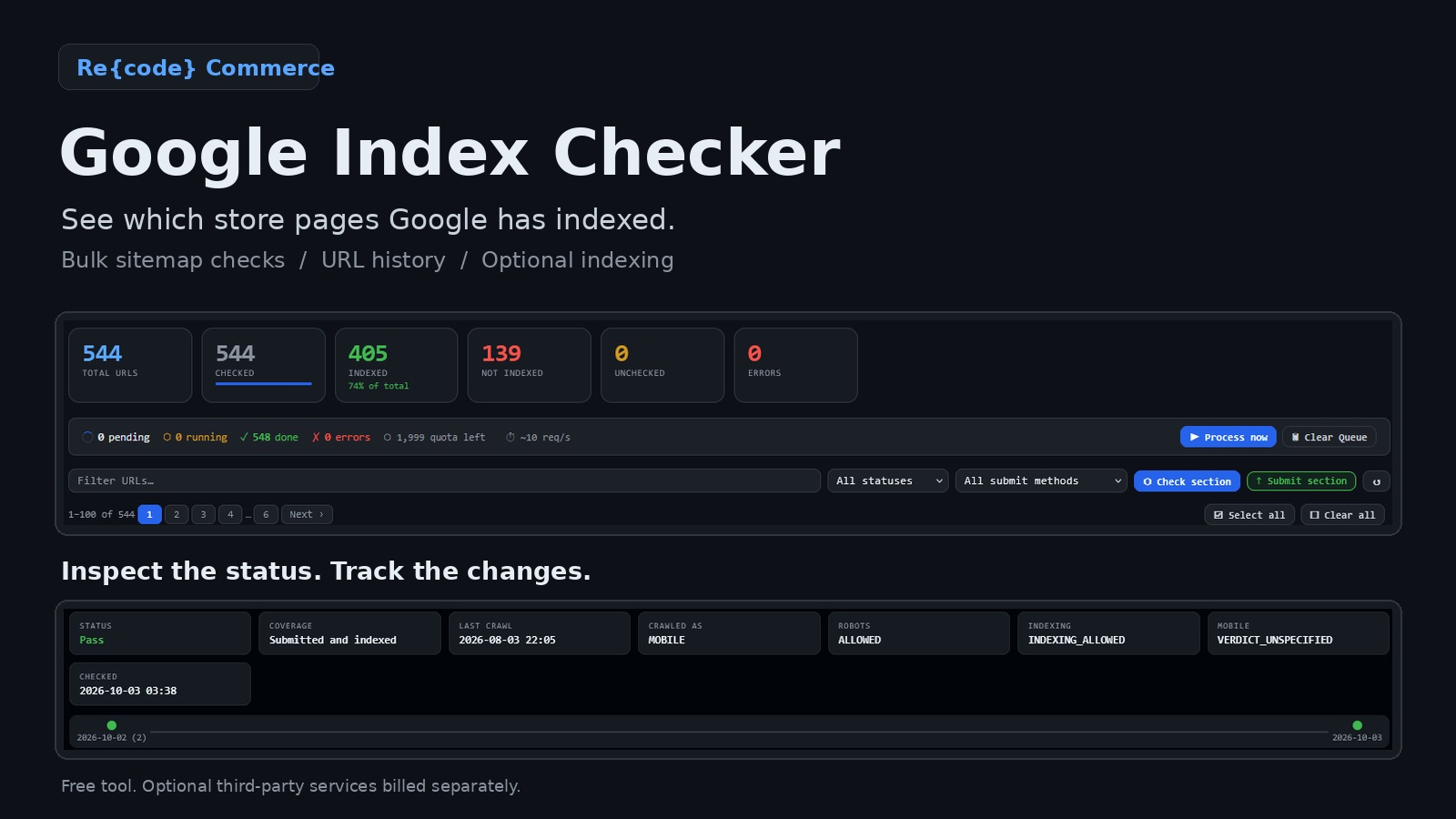
An OpenCart accessories store had 544 URLs in its sitemap. After a complete Google index check, 405 were reported as indexed and 139 were reported as not indexed. The owner now had a concrete list to work from, rather than a general concern about search visibility.
The question: which store pages has Google indexed?
A working storefront and a populated product catalog do not tell an owner which URLs Google has indexed. For this project, we used Google Index Checker by Re{code} Commerce to turn the store's sitemap into a practical index-coverage review.
The client operates an online accessories store on OpenCart. Its name, domain and identifying product details are omitted. The figures below describe one inspection snapshot, not a permanent state of the website.
The sitemap contained 544 URLs
| Section | URL count |
|---|---|
| Products | 482 |
| Categories | 26 |
| Pages | 36 |
| Total | 544 |
These are URL counts, not a verified count of unique products or SKUs. No brand or post URLs were listed in this snapshot.
The check found 139 non-indexed URLs
| Metric | Result |
|---|---|
| Total URLs | 544 |
| Checked | 544 |
| Indexed | 405 — approximately 74.4% |
| Not indexed | 139 — approximately 25.6% |
| Unchecked | 0 |
| Check errors | 0 |
Every imported URL had a check result. Roughly one in four sitemap URLs was reported as not indexed at that inspection.
The zero-error figure refers to errors recorded by the checking tool. It is not a claim that the store had no technical SEO issues.
Why the result mattered to the owner
The useful outcome was not another SEO score. It was a specific set of URLs that could be reviewed and followed up.
Instead of opening hundreds of pages individually, the owner could review the index summary, filter non-indexed URLs and open a page's available inspection details. Repeat checks provide a history rather than relying on memory or an old spreadsheet.
Indexing is one prerequisite for a URL to appear as an indexed result in Google Search. It is not a ranking or sales guarantee. Customers may also discover products through other indexed pages, ads or direct visits.
Not every non-indexed URL is a defect: redirects, duplicates and intentionally excluded pages need different treatment. The snapshot also does not establish that all 139 URLs were product pages; a section-level breakdown is needed for that claim.
From the URL list to an indexing task
The 139 non-indexed URLs were subsequently submitted to SpeedyIndex. Google Index Checker supports an optional SpeedyIndex integration, bringing inspection and external submission into the same working environment.
The reported indexing-service cost for the batch was $13.90. This is the project-specific figure supplied for this case, not a standard price for every user or evidence that every submitted URL was successfully indexed. It is separate from the free checker.
SpeedyIndex offers a pay-per-result tariff under its own conditions. The provider's terms govern token charges, refund eligibility and the final report. This is not a guarantee that Google will index every URL.
Before submitting a batch, review whether the URLs should be indexed and check for inaccessible pages, noindex directives and canonical or redirect issues.
What this case establishes
- The complete 544-URL sitemap list received check results.
- The owner could distinguish 405 indexed URLs from 139 non-indexed URLs in one dashboard.
- The non-indexed list became an actionable submission batch rather than an unresolved concern.
- The submitted batch can be followed up through the provider's report and another Google Search Console inspection.
This case documents the inspection and submission stages. A post-submission report and a repeat inspection are needed to establish how many of the original 139 URLs subsequently became indexed. No increase in traffic, rankings or sales is claimed here.
A repeatable workflow for store owners
- Import your XML sitemap.
- Connect access to your Google Search Console property.
- Run inspections and review the returned index statuses.
- Investigate URLs that should be indexed but are not.
- Use an optional submission service where appropriate.
- Recheck the original URL list and record the outcome.
Explore Google Index Checker and its setup guide. The checker is free and supplied as is; optional third-party services are billed separately.
Which pages in your store are not indexed?
Get a clearer picture before spending more time on individual URL checks. Tell us about your ecommerce project and request Google Index Checker access.